
✨ AI Summary
- This blog post provides an in-depth guide on 2D game character design, highlighting its importance in the gaming industry, expected to reach USD 13.26 billion by 2031.
- The post outlines how to create production-ready characters that meet visual, technical, animation, and engine-integration requirements, and the costly mistake of lacking a style guide.
- It discusses the influence of art styles on platforms, including pixel art, stylized cartoon, flat vector, semi-realistic, and Web3 and NFT-specific design, and their respective use cases.
- The blog also details the seven-stage design pipeline, the role of AI, and the importance of style guides for visual consistency.
- The post concludes by comparing hiring individual freelancers versus specialist studios and emphasizing that character design is as much an engineering problem as a creative one, stressing the need for technical specifications, production assets, and cost control.
2D game character design is the discipline of creating visually distinct, technically prepared character assets that function correctly inside a game engine at production scale. A character is production-ready when it meets the project’s visual, technical, animation, and engine-integration requirements. This includes appropriate reference views for the intended animation and gameplay needs, consistent proportions and visual treatment across the roster, properly structured layers or animation assets where required, and export files prepared according to the target engine, platform, and production pipeline.
What you’ll learn in this piece:
- What separates production-grade characters from concept-stage art
- Which art styles hold up across mobile, Web3, and Roblox
- The design-to-export pipeline, stage by stage
- Where AI tools help in 2026, and where they stop
- Hiring a 2D game artist directly versus 2D game art outsourcing
- Why a missing style guide is the costliest mistake in roster production
Why Character Quality Is a Business Decision
The digital art market, which encompasses game character production, is projected to reach USD 13.26 billion by 2031, growing at a 14.66% CAGR from 2026, according to Mordor Intelligence. That number matters for one specific reason: character design quality directly determines downstream revenue viability. A character designed without variant architecture cannot support skin drops. A sprite sheet built without UA reuse in mind costs a fresh production cycle every time the marketing team needs a new creative. Getting the original character design right is a creative and production decision.
The character-to-monetization chain looks like this:
- Original design determines how many distinct silhouette variants are possible without a full redraw
- Color layer structure determines whether seasonal recolors are a one-day task or a four-day rework
- Expression sheet scope at initial delivery determines whether cutscene or UA video production needs to go back to the art team
- File naming conventions established at export determine how quickly an engineer can integrate new skins into the live build
Studios that commission character art without specifying these requirements upfront typically absorb rework costs during QA or post-launch. That’s the tradeoff: investing time in a detailed brief and a thorough concept art phase costs more at the start but reduces net production spend considerably when a roster runs to 20, 40, or 80 characters.
Discuss Your Character Needs
What Art Styles Work Best for 2D Game Characters?
Style selection is a platform decision as much as an aesthetic one. Different runtime environments impose real constraints on what art styles are technically viable.
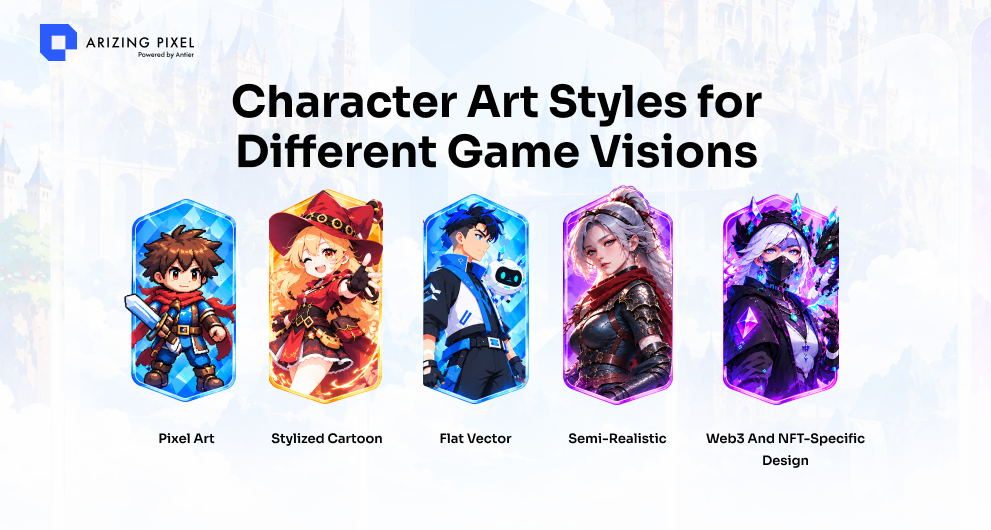
- Pixel art: Can be well suited to mobile, PC, and Telegram mini-games, particularly when lightweight assets are a priority. Sprite sheets stay lightweight, frame counts are manageable, and the style communicates genre immediately. For Telegram games in particular, where file size and load performance are critical, pixel art is a genuinely practical default, independent of any nostalgic appeal.
- Stylized cartoon: The dominant style for mobile games targeting broad audiences. Works well with Spine 2D for skeleton-based animation, where separated character artwork is organized through attachments, slots, and a bone hierarchy, avoiding the need for full frame-by-frame sprite sheets.
- Flat vector: Efficient for UI-integrated characters and hyper-casual titles. Vector artwork can be prepared for Unity through an appropriate vector-to-sprite or vector-graphics workflow. The tradeoff is limited expressiveness at high fidelity; flat vector characters read clearly at small sizes but don’t hold detail well at hero scale.
- Semi-realistic: Most appropriate for PC and console-adjacent mobile titles where the art direction demands more texture and anatomical fidelity. Production time per character is longer, and style consistency at roster scale requires a tighter style guide. Not the right fit for studios on a compressed milestone schedule with a large character count.
- Web3 and NFT-specific design: Trait-layer architecture changes how 2D character design is structured at the file level. Each visual element, such as headwear, eyes, mouth, and clothing, can be structured as an independent layer that composites cleanly with the intended trait combinations. A collection of 10,000 unique NFT characters built from 150 traits requires consistent silhouette integrity and color harmony across the combinations that are generated. That’s a different production discipline from designing 12 named hero characters for a mobile RPG.
Choosing a style for a mobile game specifically comes down to three factors: target device performance range, animation complexity required, and how many characters will ship at launch. A studio targeting mid-tier Android devices with 30 characters at launch should not be designing in semi-realistic unless the budget and timeline support the production weight that style carries.
The 2D Game Character Design Pipeline, Stage by Stage
Designing a 2D game character from scratch follows a defined sequence. Skipping or compressing stages shifts risk forward into production, where changes cost more time and more money.
Stage 1: Brief and visual reference
The creative brief covers character role, personality, gameplay function, platform target, style direction, and animation requirements. Visual reference boards establish the style vocabulary before a single line is drawn. This stage is where platform-specific constraints, Roblox asset and performance requirements, Telegram sprite sheet limits, and Unity sprite renderer requirements get documented.
Stage 2: Silhouette exploration
Black silhouette thumbnails, typically 8 to 12 variations, test whether the character reads distinctly from other roster members at small display sizes. A hero character that looks identical in silhouette to an enemy type creates UX problems in gameplay. This stage costs very little to iterate; fixing a silhouette problem at the turnaround sheet stage costs significantly more.
Stage 3: Concept art and style development
Two to three full-color concept renders develop the chosen silhouette into a fleshed-out design, covering color palette, material texture, and secondary detail. An experienced concept art studio handles this stage as explicit risk-reduction: a locked concept prevents rework during the sprite or rig production that follows.
Stage 4: Turnaround sheet production
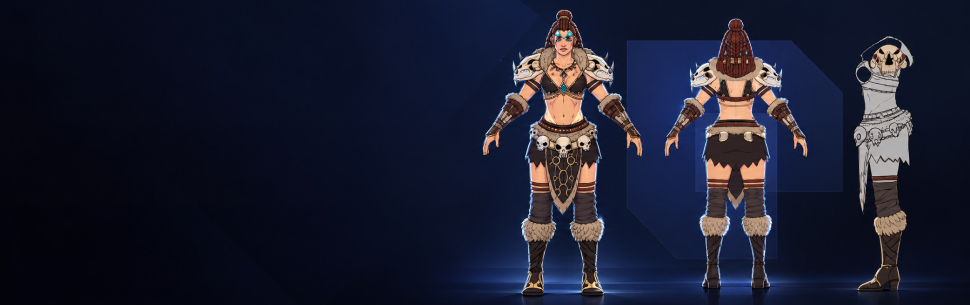
Front, side, back, and, where required, three-quarter views, drawn to the same proportional grid, give animators and riggers consistent references for the views needed by the production pipeline.
Stage 5: Expression and pose sheets
Idle, run, attack, death, and any game-specific state animations require reference poses and expression variants before rig or frame-by-frame production begins. The scope of this sheet directly determines animation production time downstream.
Stage 6: Animation preparation and rig or sprite sheet production
For Spine 2D skeleton rigs, character parts are separated into named layers following a strict hierarchy. For frame-by-frame pixel art, individual frames are assembled into sprite sheets at the correct atlas dimensions. Either path targets specific export requirements: sprite sheets for Unity’s 2D sprite renderer, Spine skeleton files for Spine’s runtime, or exported PNGs at the correct resolution for Godot’s 2D engine.
Tools used across this pipeline include Adobe Photoshop, Adobe Illustrator, Procreate, Aseprite (pixel art and animation), Spine 2D (skeleton animation), and Affinity Designer. Engine integration is validated against Unity, Godot, and Cocos2d depending on the project target.
Stage 7: Engine-ready export and handoff
Final export packages include named sprite atlas files, Spine JSON or binary export files, animation state lists, and a brief technical integration note specifying import settings. A clean handoff means an engineer can integrate the character without going back to the art team for clarifications.
Discuss Your Character Needs
Where AI Fits in 2026, and Where It Doesn’t
The GDC Festival of Gaming’s “2026 State of the Game Industry” report, surveying over 2,300 industry professionals, found that generative AI is used for asset generation by only 19% of AI adopters in the game industry. The majority, 81%, use it for research and brainstorming
That split maps directly onto how AI tools actually perform in a character pipeline. At the ideation stage, generating visual reference directions, exploring color palettes, and producing mood board variations, AI tools accelerate work that previously required hours of manual research. But production-grade character assets require something AI tools do not reliably deliver: style consistency across a roster, correct silhouette hierarchy, engine-compatible layer naming, and animation-ready file structure.
The Production Framework Behind Consistent Character Rosters
A single well-designed character is a portfolio piece. A roster of 40 characters that holds visual consistency is a shipped game. Style guides are the mechanism that bridges the gap. A production-grade style guide for a 2D character roster covers:
- Proportion grid: Consistent head-to-body ratio across all characters, hero and enemy alike
- Line weight standards: Stroke width at outline, detail, and shadow levels
- Color palette master: Named swatches covering skin tones, material families, and faction color identities
- Shading methodology: Whether characters use flat color, cel-shading, or a gradient approach, documented with visual examples so every artist on the batch produces consistent results
- Animation frame standards: Frame count per state, easing conventions, and pivot point placement
Studios that begin a batch without a locked style guide typically discover consistency problems during integration, when characters built by different artists look like they belong to different games. Fixing that at integration costs more in revision time than building the style guide cost in the first place.
The 2D and 3D animation services pipeline covers body and facial animations from pre-production through post-production, ensuring that style guides and rigging standards for animation consistency are established before frame production begins.
Freelancer vs. Specialist Studio for 2D Game Character Design
Here’s a direct comparison across the factors that matter most for a mobile studio or publisher commissioning a character batch:
| Factor | Freelancer | Specialist Studio |
|---|---|---|
| Roster consistency (20+ characters) | Can vary across a large batch | Maintained through a shared style guide and production standards |
| Engine-ready file delivery | Depends on individual workflow and platform experience | Standardized export specifications for each target platform |
| Style guide ownership | May not be included in the scope | Created and maintained as part of the production pipeline |
| Revision scope | Depends on the individual contract | Defined revision rounds documented upfront |
| Web3 / trait-layer architecture | May require additional specialist support | Supported by a multidisciplinary production team |
| Roblox / Telegram platform-specific specs | Platform expertise may vary | Platform-specific requirements handled within one pipeline |
| Timeline reliability across a batch | Production depends on one contributor | Parallel production enables greater team capacity and continuity |
For a single hero character, mascot, or early prototype, a freelancer can be a practical choice. For a title requiring 15 or more characters with a consistent art style and engine-specific delivery, a specialist 2D character design studio provides a more structured production pipeline, coordinated workflows, and the team capacity needed to manage the full character batch efficiently.
What should you look for in a 2D character design studio?
The key indicators are confirmed engine-ready export experience (not just “we can export files,” but documented experience with your specific runtime), a stated style guide process, platform-specific work on your target, Unity, Godot, Roblox, Web3, and a clearly defined revision structure. Portfolio consistency across a full roster carries more signal than individual showcase pieces.
How long does 2D game character design take?
For a single character at cartoon stylized quality, 6 to 10 weeks from brief to engine-ready export is a realistic range. A roster of 20 characters in parallel production typically runs 12 to 20 weeks. Complex rigs or semi-realistic styles extend both timelines.
Conclusion
Character design at roster scale is as much an engineering problem as a creative one. Every decision made at the concept art stage, silhouette architecture, color layer structure, expression scope, file naming- determines how much friction appears during integration, QA, and every content update after launch. The studios that ship clean, consistent character rosters are the ones that treat the design brief as a technical specification, the style guide as a production asset, and the concept art phase as genuine cost control.
At Arizing Pixel, we build 2D game character design pipelines that run from the initial brief through engine-ready export across Unity, Godot, Web3, Roblox, and Telegram, so every character in your roster ships on schedule and integrates without rework.
Frequently Asked Questions
01. What is 2D game character design?
2D game character design involves creating visually distinct and technically prepared character assets that function correctly within a game engine, meeting visual, technical, animation, and integration requirements.
02. Why is character design quality important for business?
Character design quality directly impacts revenue viability, as it determines the ability to create variants, manage production costs, and streamline integration processes, ultimately affecting the game's profitability.
03. What are the benefits of having a detailed brief for character art production?
A detailed brief helps reduce rework costs during quality assurance and post-launch by ensuring that all visual and technical requirements are met upfront, leading to a more efficient production process.

